Room Status Report
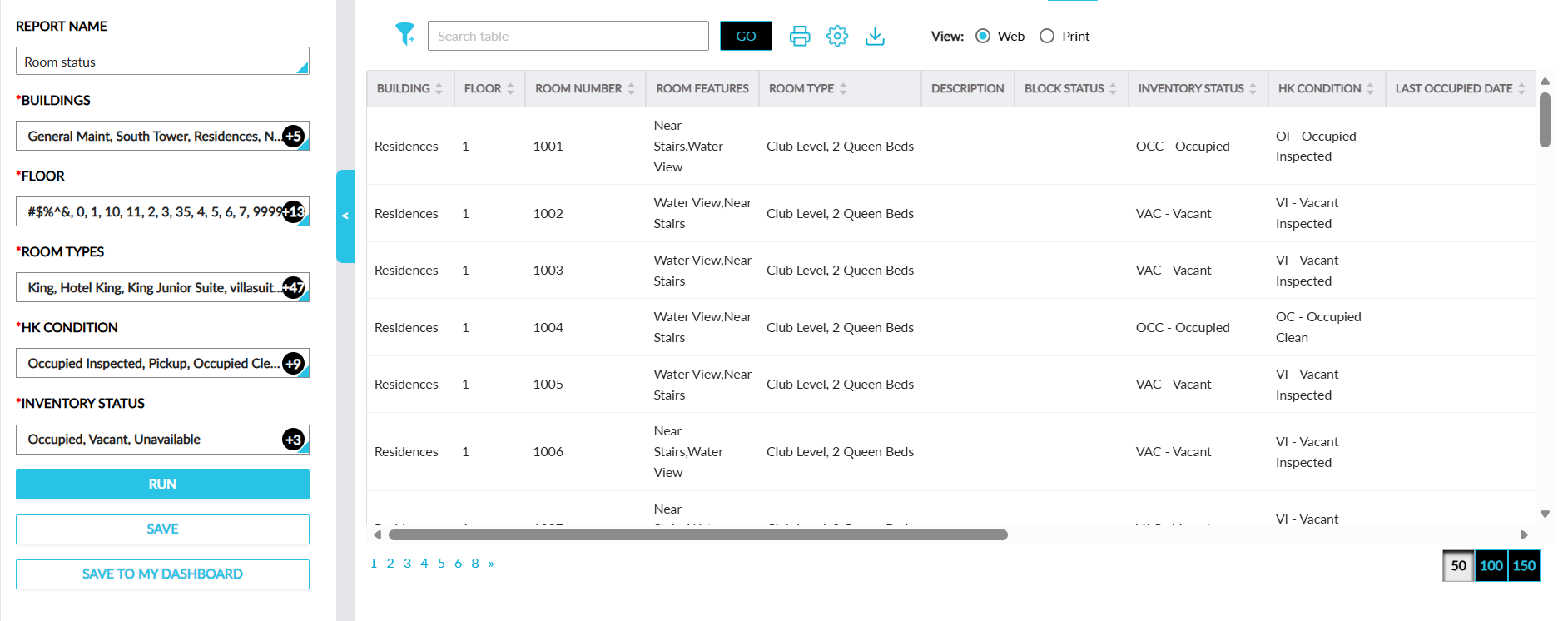
The Room Status report allows users to track the housekeeping condition and inventory status of the rooms located at the selected buildings at a property.
Perform the following steps to generate the report:
Navigate to Reports ➜ Dynamic Reports ➜ Housekeeping ➜ Room Status report.
Refer to the following table and fill in the fields.
|
Field |
Description |
|---|---|
|
Report Name |
Room Status. |
|
Buildings |
This is a mandatory multi-select drop-down list that allows users to select the buildings available at the property. |
|
Floor |
This is a mandatory multi-select drop-down list that allows users to select the floors available in the selected buildings. |
|
Room Type |
This is a mandatory multi-select drop-down list that allows users to select the room types available in each floor of a building. |
|
HK Condition |
This is a mandatory multi-select drop-down list that allows users to select the housekeeping conditions of rooms to be included in the report. |
|
Inventory Status |
This is a mandatory multi-select drop-down list that allows users to select the inventory status of rooms. |
Click Run to generate the report.
Click Save to save the report under User Favorites section.
Sample Report
Report Fields
This report displays the following fields:
|
Field |
Description |
|---|---|
|
Building |
Each of the buildings selected for report generation. This column can be sorted and filtered. |
|
Floor |
Each of the floors selected for report generation. This column can be sorted and filtered. |
|
Room Number |
The room number of the rooms located in each floor. This column can be sorted. |
|
Room Features |
The features available for each room. |
|
Room Type |
The room type of the room. This column can be sorted and filtered. |
|
Description |
The description of the room type. |
|
Block Status |
The block status of the room. This column can be sorted and filtered. |
|
Inventory Status |
The inventory status of the room. This column can be sorted and filtered. |
|
HK Condition |
The housekeeping condition of the room. This column can be sorted and filtered. |
|
Last Occupied Date |
The date when a room was last occupied. This column can be sorted. |
|
Last Service Date |
The date of the last completed housekeeping service for a room. This column can be sorted. |
|
Last Service Completed |
The last completed housekeeping service for a room. This column can be sorted and filtered. |
|
Last Assigned Associate |
The name of the associate who completed the last assigned service request for the room. This column can be sorted and filtered. |
|
Last HK Condition |
The previous housekeeping condition of the room. This column can be sorted. |
|
Days Unoccupied |
The number of days for which a room was vacant. This column can be sorted. |
|
Next Reservation Date |
The date of the next reservation for the room. This column can be sorted. |